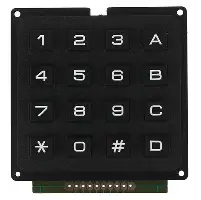
4×4 Matrix 16 Keyboard Keypad

  1. Easy communication with any microcontroller.
  2. Tactile type switches.
  3. Over 1,000,000 operations per key.
  4. Contact rated for 12V dc @ 20mA.
  5. Over 1,000,000 operations per key.

Apple Shopping Event

Hurry and get discounts on all Apple devices up to 20%

Original price was: 150,00 EGP.Current price is: 130,00 EGP.

8 People watching this product now!

Payment Methods:

Description

The 4×4 Keypad (16 Button) Matrix Array Membrane Switch is a high-quality, durable input device designed for use in a wide range of electronic projects and applications. Featuring 16 tactile, responsive buttons arranged in a 4×4 matrix, this membrane switch offers an intuitive interface for user input. It is perfect for controlling devices, entering numerical values, or navigating through menu systems in microcontroller-based projects.

Key Features:

  • 16 Button Configuration: 4×4 matrix layout for convenient button arrangement.
  • Durable and Reliable: Built to withstand long-term use, providing consistent performance.
  • Compact Design: Space-saving form factor ideal for tight project spaces.
  • Easy Integration: Simple to interface with microcontrollers such as Arduino and Raspberry Pi.
  • Wide Compatibility: Suitable for a variety of applications including security systems, appliances, robotics, and more.

Applications:

  • Home Automation Systems
  • Security Keypads
  • Industrial Control Panels
  • Gaming Consoles and Devices
  • DIY Electronics Projects

With its high durability and easy integration, the 4×4 Keypad Matrix Array Membrane Switch is the ideal solution for anyone looking to enhance their electronics project with a reliable input method. Whether you’re a hobbyist, engineer, or developer, this keypad will meet your needs for efficiency and performance.

🔌
Pin Connections
1 Table
Pin Connections Table 1
BoardSensor PinConnection
Keypad4 rows + 4 cols8 board digital pins
📟
4x4 Matrix 16 Keyboard Keypad
7 Examples • C/C++ | Boards: Arduino Uno, Arduino Nano, Arduino Mega, ESP32, ESP8266, STM32, Raspberry Pi Pico
4x4 Matrix 16 Keyboard Keypad - Arduino Uno
4x4 Matrix 16 Keyboard Keypad - Arduino Nano
4x4 Matrix 16 Keyboard Keypad - Arduino Mega
4x4 Matrix 16 Keyboard Keypad - ESP32
4x4 Matrix 16 Keyboard Keypad - ESP8266
4x4 Matrix 16 Keyboard Keypad - STM32
4x4 Matrix 16 Keyboard Keypad - Raspberry Pi Pico
📄 File: 4x4_matrix_16_keyboard_keypad_-_arduino_uno.inoArduino Uno
608 characters
1//ekostra.com
2//electronics store in egypt
3//+201008896258
4
5// Row pins on Arduino Uno: 9, 8, 7, 6 Column pins: 5, 4, 3, 2
6#include <Keypad.h>
7
8const byte ROWS = 4;
9const byte COLS = 4;
10char keys[ROWS][COLS] = {
11 {'1','2','3','A'},
12 {'4','5','6','B'},
13 {'7','8','9','C'},
14 {'*','0','#','D'}
15};
16byte rowPins[ROWS] = {9, 8, 7, 6};
17byte colPins[COLS] = {5, 4, 3, 2};
18
19Keypad keypad = Keypad(makeKeymap(keys), rowPins, colPins, ROWS, COLS);
20
21void setup() {
22 Serial.begin(115200);
23}
24
25void loop() {
26 char key = keypad.getKey();
27 if (key) {
28 Serial.print("Key pressed: ");
29 Serial.println(key);
30 }
31}
📄 File: 4x4_matrix_16_keyboard_keypad_-_arduino_nano.inoArduino Nano
609 characters
1//ekostra.com
2//electronics store in egypt
3//+201008896258
4
5// Row pins on Arduino Nano: 9, 8, 7, 6 Column pins: 5, 4, 3, 2
6#include <Keypad.h>
7
8const byte ROWS = 4;
9const byte COLS = 4;
10char keys[ROWS][COLS] = {
11 {'1','2','3','A'},
12 {'4','5','6','B'},
13 {'7','8','9','C'},
14 {'*','0','#','D'}
15};
16byte rowPins[ROWS] = {9, 8, 7, 6};
17byte colPins[COLS] = {5, 4, 3, 2};
18
19Keypad keypad = Keypad(makeKeymap(keys), rowPins, colPins, ROWS, COLS);
20
21void setup() {
22 Serial.begin(115200);
23}
24
25void loop() {
26 char key = keypad.getKey();
27 if (key) {
28 Serial.print("Key pressed: ");
29 Serial.println(key);
30 }
31}
📄 File: 4x4_matrix_16_keyboard_keypad_-_arduino_mega.inoArduino Mega
609 characters
1//ekostra.com
2//electronics store in egypt
3//+201008896258
4
5// Row pins on Arduino Mega: 9, 8, 7, 6 Column pins: 5, 4, 3, 2
6#include <Keypad.h>
7
8const byte ROWS = 4;
9const byte COLS = 4;
10char keys[ROWS][COLS] = {
11 {'1','2','3','A'},
12 {'4','5','6','B'},
13 {'7','8','9','C'},
14 {'*','0','#','D'}
15};
16byte rowPins[ROWS] = {9, 8, 7, 6};
17byte colPins[COLS] = {5, 4, 3, 2};
18
19Keypad keypad = Keypad(makeKeymap(keys), rowPins, colPins, ROWS, COLS);
20
21void setup() {
22 Serial.begin(115200);
23}
24
25void loop() {
26 char key = keypad.getKey();
27 if (key) {
28 Serial.print("Key pressed: ");
29 Serial.println(key);
30 }
31}
📄 File: 4x4_matrix_16_keyboard_keypad_-_esp32.inoESP32
618 characters
1//ekostra.com
2//electronics store in egypt
3//+201008896258
4
5// Row pins on ESP32: 13, 12, 14, 27 Column pins: 26, 25, 33, 32
6#include <Keypad.h>
7
8const byte ROWS = 4;
9const byte COLS = 4;
10char keys[ROWS][COLS] = {
11 {'1','2','3','A'},
12 {'4','5','6','B'},
13 {'7','8','9','C'},
14 {'*','0','#','D'}
15};
16byte rowPins[ROWS] = {13, 12, 14, 27};
17byte colPins[COLS] = {26, 25, 33, 32};
18
19Keypad keypad = Keypad(makeKeymap(keys), rowPins, colPins, ROWS, COLS);
20
21void setup() {
22 Serial.begin(115200);
23}
24
25void loop() {
26 char key = keypad.getKey();
27 if (key) {
28 Serial.print("Key pressed: ");
29 Serial.println(key);
30 }
31}
📄 File: 4x4_matrix_16_keyboard_keypad_-_esp8266.inoESP8266
620 characters
1//ekostra.com
2//electronics store in egypt
3//+201008896258
4
5// Row pins on ESP8266: D0, D3, D4, D5 Column pins: D6, D7, D8, D2
6#include <Keypad.h>
7
8const byte ROWS = 4;
9const byte COLS = 4;
10char keys[ROWS][COLS] = {
11 {'1','2','3','A'},
12 {'4','5','6','B'},
13 {'7','8','9','C'},
14 {'*','0','#','D'}
15};
16byte rowPins[ROWS] = {D0, D3, D4, D5};
17byte colPins[COLS] = {D6, D7, D8, D2};
18
19Keypad keypad = Keypad(makeKeymap(keys), rowPins, colPins, ROWS, COLS);
20
21void setup() {
22 Serial.begin(115200);
23}
24
25void loop() {
26 char key = keypad.getKey();
27 if (key) {
28 Serial.print("Key pressed: ");
29 Serial.println(key);
30 }
31}
📄 File: 4x4_matrix_16_keyboard_keypad_-_stm32.inoSTM32
634 characters
1//ekostra.com
2//electronics store in egypt
3//+201008896258
4
5// Row pins on STM32: PA0, PA1, PA2, PA3 Column pins: PA4, PA5, PA6, PA7
6#include <Keypad.h>
7
8const byte ROWS = 4;
9const byte COLS = 4;
10char keys[ROWS][COLS] = {
11 {'1','2','3','A'},
12 {'4','5','6','B'},
13 {'7','8','9','C'},
14 {'*','0','#','D'}
15};
16byte rowPins[ROWS] = {PA0, PA1, PA2, PA3};
17byte colPins[COLS] = {PA4, PA5, PA6, PA7};
18
19Keypad keypad = Keypad(makeKeymap(keys), rowPins, colPins, ROWS, COLS);
20
21void setup() {
22 Serial.begin(115200);
23}
24
25void loop() {
26 char key = keypad.getKey();
27 if (key) {
28 Serial.print("Key pressed: ");
29 Serial.println(key);
30 }
31}
📄 File: 4x4_matrix_16_keyboard_keypad_-_raspberry_pi_pico.inoRaspberry Pi Pico
630 characters
1//ekostra.com
2//electronics store in egypt
3//+201008896258
4
5// Row pins on Raspberry Pi Pico: 10, 11, 12, 13 Column pins: 14, 15, 16, 17
6#include <Keypad.h>
7
8const byte ROWS = 4;
9const byte COLS = 4;
10char keys[ROWS][COLS] = {
11 {'1','2','3','A'},
12 {'4','5','6','B'},
13 {'7','8','9','C'},
14 {'*','0','#','D'}
15};
16byte rowPins[ROWS] = {10, 11, 12, 13};
17byte colPins[COLS] = {14, 15, 16, 17};
18
19Keypad keypad = Keypad(makeKeymap(keys), rowPins, colPins, ROWS, COLS);
20
21void setup() {
22 Serial.begin(115200);
23}
24
25void loop() {
26 char key = keypad.getKey();
27 if (key) {
28 Serial.print("Key pressed: ");
29 Serial.println(key);
30 }
31}
16-button matrix keypad.

نظرة عامة ومواصفات المنتج — بالعربية

4×4 Matrix 16 Keyboard Keypad متوفر الآن في متجر إكوسترا للإلكترونيات، ضمن قسم Electronic Modules وElectronic Switches/Keypads، بسعر 130,00 EGP. كود المنتج لدينا: EK1725. المنتج غير متوفر حالياً — تواصل معنا عبر واتساب لمعرفة موعد توفره القادم.

أهم المواصفات الفنية:

  • Item Type: Keypad Module
  • Model Type: Keyboard Keypad
  • الخامة: Plastic
  • اللون: Black
  • Additional Specs: Each Key Dimension (LxW) (mm): 8.3 x 7.3, Pad Size (mm) LxWxH: 64x50x10, Space between keys: 6mm
  • Mounting Hole Distance: 60mm x 58mm (center)
  • Key Type: 4×4
  • Mounting Hole Diameter Mm: 2

هذا المنتج مناسب لمشاريع الأردوينو (Arduino) و ESP32 و Raspberry Pi، ومشاريع الروبوتات وإنترنت الأشياء والتعليم الهندسي. جميع القطع مفحوصة قبل الشحن.

تصفّح المزيد من Electronic Modules في إكوسترا.

Specification

Specification

WeightWeight8 g
Dimensions4 × 3 × 1,5 cm
item-typeKeypad Module
model-typeKeyboard Keypad
materialPlastic
colorBlack
additional-specsEach Key Dimension (LxW) (mm): 8.3 x 7.3, Pad Size (mm) LxWxH: 64x50x10, Space between keys: 6mm
mounting-hole-distance60mm x 58mm (center)
key-type4×4
mounting-hole-diameter-mm2

Customer Reviews