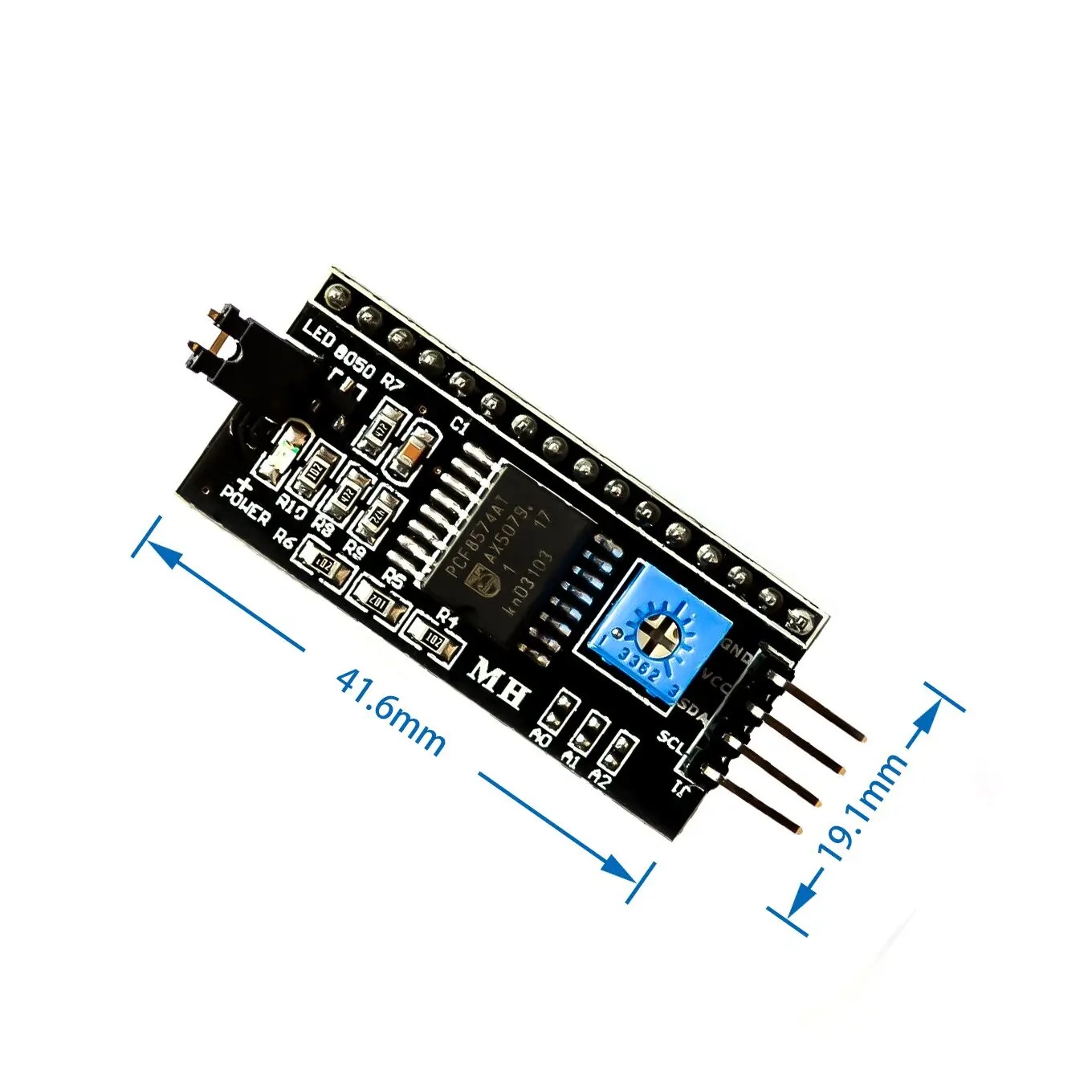
This is a RoHS compliant I2C Serial LCD Daughter board that can be connected to a standard 16×2 or 20×4 Character Display Module that supports 4-bit mode. All Character Modules sold on our site support 4-bit mode, and nearly all commercially available 16×2 and 20×4 line character modules support it too.
This board has a PCF8574 I2C chip that converts I2C serial data to parallel data for the LCD display. There are many examples on the internet for using this board with Arduino. Do a search for “Arduino LCD PCF8574 “. The I2C address is 0x3F by default, but this can be changed via 3 solder jumpers provided on the board. This allows up to 3 LCD displays to be controlled via a single I2C bus (giving each one it’s own address)
Specifications and Features:
5V power supply .
Serial I2C control of LCD display using PCF8574.
Backlight can be enabled or disabled via a jumper on the board.
Contrast control via a potentiometer.
Can have 8 modules on a single I2C bus (change address via solder jumpers)address, allowing.
Size :41.6 x 19.2 mm.
Package Includes: 1 x IIC/I2C Serial Interface Adapter Module
Pin Connections Table 1
Board Name PCF8574 I2C LCD Connection Details (Voltage Notes) Arduino Uno PCF8574 VCC->5V, GND->GND, SDA->A4, SCL->A5. 5V logic, direct connection. Arduino Nano PCF8574 VCC->5V, GND->GND, SDA->A4, SCL->A5. 5V logic, direct connection. Arduino Mega PCF8574 VCC->5V, GND->GND, SDA->20, SCL->21. 5V logic, direct connection. ESP32 PCF8574 VCC->5V (VIN), GND->GND, SDA->21, SCL->22. 3.3V logic; use level shifter (e.g., TXB0108) on SDA/SCL lines. Alternatively, power PCF8574 at 3.3V if LCD supports it. ESP8266 PCF8574 VCC->5V (VIN), GND->GND, SDA->4 (D2), SCL->5 (D1). 3.3V logic; level shifter recommended. STM32 PCF8574 VCC->5V (VBUS), GND->GND, SDA->PB7, SCL->PB6 (default). 3.3V logic; level shifter recommended. Raspberry Pi Pico PCF8574 VCC->5V (VBUS), GND->GND, SDA->0 (I2C0), SCL->1 (I2C0). 3.3V logic; level shifter recommended.
I2C LCD - Arduino Uno
I2C LCD - Arduino Nano
I2C LCD - Arduino Mega
I2C LCD - ESP32
I2C LCD - ESP8266
I2C LCD - STM32
I2C LCD - Raspberry Pi Pico
1 /*
2 * ekostra.com
3 * ekostra electronics store in egypt
4 */
5
6 #include <Wire.h>
7 #include <LiquidCrystal_I2C.h>
8
9 // Set the LCD address (commonly 0x27 or 0x3F)
10 #define LCD_ADDR 0x27
11 // Define LCD dimensions (change to 20 ,4 if using 20x4)
12 #define LCD_COLS 16
13 #define LCD_ROWS 2
14
15 // Create LCD objectnLiquidCrystal_I2C lcd(LCD_ADDR, LCD_COLS, LCD_ROWS);
16
17 void setup () {
18 // Initialize serial monitor for debuggingn Serial.begin (115200 );
19
20 // Initialize I2C (default pins A4/A5 for Uno)
21 Wire.begin();
22
23 // Initialize LCDn lcd.init();
24 // Turn on backlightn lcd.backlight();
25 // Clear screenn lcd.clear();
26
27 // Print welcome messagen lcd.setCursor(0 , 0 );
28 lcd.print("Hello, World!" );
29 lcd.setCursor(0 , 1 );
30 lcd.print("Count: " );
31 }
32
33 void loop () {
34 static int count = 0 ;
35 // Display counter at column 7 , row 1
36 lcd.setCursor(7 , 1 );
37 lcd.print(count);
38 delay (1000 );
39 count++;
40 }
1 /*
2 * ekostra.com
3 * ekostra electronics store in egypt
4 */
5
6 #include <Wire.h>
7 #include <LiquidCrystal_I2C.h>
8
9 // Set the LCD address (commonly 0x27 or 0x3F)
10 #define LCD_ADDR 0x27
11 // Define LCD dimensions (change to 20 ,4 if using 20x4)
12 #define LCD_COLS 16
13 #define LCD_ROWS 2
14
15 // Create LCD objectnLiquidCrystal_I2C lcd(LCD_ADDR, LCD_COLS, LCD_ROWS);
16
17 void setup () {
18 // Initialize serial monitor for debuggingn Serial.begin (115200 );
19
20 // Initialize I2C (default pins A4/A5 for Nano)
21 Wire.begin();
22
23 // Initialize LCDn lcd.init();
24 // Turn on backlightn lcd.backlight();
25 // Clear screenn lcd.clear();
26
27 // Print welcome messagen lcd.setCursor(0 , 0 );
28 lcd.print("Hello, World!" );
29 lcd.setCursor(0 , 1 );
30 lcd.print("Count: " );
31 }
32
33 void loop () {
34 static int count = 0 ;
35 // Display counter at column 7 , row 1
36 lcd.setCursor(7 , 1 );
37 lcd.print(count);
38 delay (1000 );
39 count++;
40 }
1 /*
2 * ekostra.com
3 * ekostra electronics store in egypt
4 */
5
6 #include <Wire.h>
7 #include <LiquidCrystal_I2C.h>
8
9 // Set the LCD address (commonly 0x27 or 0x3F)
10 #define LCD_ADDR 0x27
11 // Define LCD dimensions (change to 20 ,4 if using 20x4)
12 #define LCD_COLS 16
13 #define LCD_ROWS 2
14
15 // Create LCD objectnLiquidCrystal_I2C lcd(LCD_ADDR, LCD_COLS, LCD_ROWS);
16
17 void setup () {
18 // Initialize serial monitor for debuggingn Serial.begin (115200 );
19
20 // Initialize I2C (default pins 20 /21 for Mega)
21 Wire.begin();
22
23 // Initialize LCDn lcd.init();
24 // Turn on backlightn lcd.backlight();
25 // Clear screenn lcd.clear();
26
27 // Print welcome messagen lcd.setCursor(0 , 0 );
28 lcd.print("Hello, World!" );
29 lcd.setCursor(0 , 1 );
30 lcd.print("Count: " );
31 }
32
33 void loop () {
34 static int count = 0 ;
35 // Display counter at column 7 , row 1
36 lcd.setCursor(7 , 1 );
37 lcd.print(count);
38 delay (1000 );
39 count++;
40 }
1 /*
2 * ekostra.com
3 * ekostra electronics store in egypt
4 */
5
6 #include <Wire.h>
7 #include <LiquidCrystal_I2C.h>
8
9 // Set the LCD address (commonly 0x27 or 0x3F)
10 #define LCD_ADDR 0x27
11 // Define LCD dimensions (change to 20 ,4 if using 20x4)
12 #define LCD_COLS 16
13 #define LCD_ROWS 2
14
15 // ESP32 I2C pins (default: SDA=21 , SCL=22 )
16 #define I2C_SDA 21
17 #define I2C_SCL 22
18
19 // Create LCD objectnLiquidCrystal_I2C lcd(LCD_ADDR, LCD_COLS, LCD_ROWS);
20
21 void setup () {
22 // Initialize serial monitor for debuggingn Serial.begin (115200 );
23
24 // Initialize I2C with custom pinsn Wire.begin(I2C_SDA, I2C_SCL);
25
26 // Initialize LCDn lcd.init();
27 // Turn on backlightn lcd.backlight();
28 // Clear screenn lcd.clear();
29
30 // Print welcome messagen lcd.setCursor(0 , 0 );
31 lcd.print("Hello, World!" );
32 lcd.setCursor(0 , 1 );
33 lcd.print("Count: " );
34 }
35
36 void loop () {
37 static int count = 0 ;
38 // Display counter at column 7 , row 1
39 lcd.setCursor(7 , 1 );
40 lcd.print(count);
41 delay (1000 );
42 count++;
43 }
1 /*
2 * ekostra.com
3 * ekostra electronics store in egypt
4 */
5
6 #include <Wire.h>
7 #include <LiquidCrystal_I2C.h>
8
9 // Set the LCD address (commonly 0x27 or 0x3F)
10 #define LCD_ADDR 0x27
11 // Define LCD dimensions (change to 20 ,4 if using 20x4)
12 #define LCD_COLS 16
13 #define LCD_ROWS 2
14
15 // ESP8266 I2C pins (SDA=GPIO4/D2, SCL=GPIO5/D1)
16 #define I2C_SDA 4
17 #define I2C_SCL 5
18
19 // Create LCD objectnLiquidCrystal_I2C lcd(LCD_ADDR, LCD_COLS, LCD_ROWS);
20
21 void setup () {
22 // Initialize serial monitor for debuggingn Serial.begin (115200 );
23
24 // Initialize I2C with custom pinsn Wire.begin(I2C_SDA, I2C_SCL);
25
26 // Initialize LCDn lcd.init();
27 // Turn on backlightn lcd.backlight();
28 // Clear screenn lcd.clear();
29
30 // Print welcome messagen lcd.setCursor(0 , 0 );
31 lcd.print("Hello, World!" );
32 lcd.setCursor(0 , 1 );
33 lcd.print("Count: " );
34 }
35
36 void loop () {
37 static int count = 0 ;
38 // Display counter at column 7 , row 1
39 lcd.setCursor(7 , 1 );
40 lcd.print(count);
41 delay (1000 );
42 count++;
43 }
1 /*
2 * ekostra.com
3 * ekostra electronics store in egypt
4 */
5
6 #include <Wire.h>
7 #include <LiquidCrystal_I2C.h>
8
9 // Set the LCD address (commonly 0x27 or 0x3F)
10 #define LCD_ADDR 0x27
11 // Define LCD dimensions (change to 20 ,4 if using 20x4)
12 #define LCD_COLS 16
13 #define LCD_ROWS 2
14
15 // STM32 (Blue Pill) default I2C pins: SDA=PB7, SCL=PB6
16 // We'll use default Wire.begin() without argumentsnn// Create LCD objectnLiquidCrystal_I2C lcd(LCD_ADDR, LCD_COLS, LCD_ROWS);
17
18 void setup () {
19 // Initialize serial monitor for debuggingn Serial.begin (115200 );
20
21 // Initialize I2C (uses default pins)
22 Wire.begin();
23
24 // Initialize LCDn lcd.init();
25 // Turn on backlightn lcd.backlight();
26 // Clear screenn lcd.clear();
27
28 // Print welcome messagen lcd.setCursor(0 , 0 );
29 lcd.print("Hello, World!" );
30 lcd.setCursor(0 , 1 );
31 lcd.print("Count: " );
32 }
33
34 void loop () {
35 static int count = 0 ;
36 // Display counter at column 7 , row 1
37 lcd.setCursor(7 , 1 );
38 lcd.print(count);
39 delay (1000 );
40 count++;
41 }
1 /*
2 * ekostra.com
3 * ekostra electronics store in egypt
4 */
5
6 #include <Wire.h>
7 #include <LiquidCrystal_I2C.h>
8
9 // Set the LCD address (commonly 0x27 or 0x3F)
10 #define LCD_ADDR 0x27
11 // Define LCD dimensions (change to 20 ,4 if using 20x4)
12 #define LCD_COLS 16
13 #define LCD_ROWS 2
14
15 // Raspberry Pi Pico I2C0 pins: SDA=GP0, SCL=GP1
16 #define I2C_SDA 0
17 #define I2C_SCL 1
18
19 // Create LCD objectnLiquidCrystal_I2C lcd(LCD_ADDR, LCD_COLS, LCD_ROWS);
20
21 void setup () {
22 // Initialize serial monitor for debuggingn Serial.begin (115200 );
23
24 // Initialize I2C with custom pinsn Wire.begin(I2C_SDA, I2C_SCL);
25
26 // Initialize LCDn lcd.init();
27 // Turn on backlightn lcd.backlight();
28 // Clear screenn lcd.clear();
29
30 // Print welcome messagen lcd.setCursor(0 , 0 );
31 lcd.print("Hello, World!" );
32 lcd.setCursor(0 , 1 );
33 lcd.print("Count: " );
34 }
35
36 void loop () {
37 static int count = 0 ;
38 // Display counter at column 7 , row 1
39 lcd.setCursor(7 , 1 );
40 lcd.print(count);
41 delay (1000 );
42 count++;
43 }
Project Notes: Example project for driving a 16x2 or 20x4 LCD with PCF8574 I2C backpack on multiple boards. Includes voltage level shifting guidance for 3.3V boards.
نظرة عامة ومواصفات المنتج — بالعربية I2C LCD Adapter Board (PCF8574) – 16×2 / 20×4 متوفر الآن في متجر إكوسترا للإلكترونيات، ضمن قسم Electronic Modules وUSB Interface Module، بسعر 60,00 EGP. كود المنتج لدينا: EK344. المنتج متوفر في المخزون وجاهز للشحن الفوري لكل محافظات مصر مع إمكانية الدفع عند الاستلام.
أهم المواصفات الفنية:
Type: I2C Serial LCD Interface AdapterCompatible Lcd Size: 16×2 / 20×4 Character LCDLcd Mode: 4-bit ModeController Ic: PCF8574Communication Interface: I2COperating Voltage: 5VDefault I2C Address: 0x3FAddress Selection: Via 3 Solder Jumpersهذا المنتج مناسب لمشاريع الأردوينو (Arduino) و ESP32 و Raspberry Pi، ومشاريع الروبوتات وإنترنت الأشياء والتعليم الهندسي. جميع القطع مفحوصة قبل الشحن.
تصفّح المزيد من Electronic Modules في إكوسترا.




 Specification


