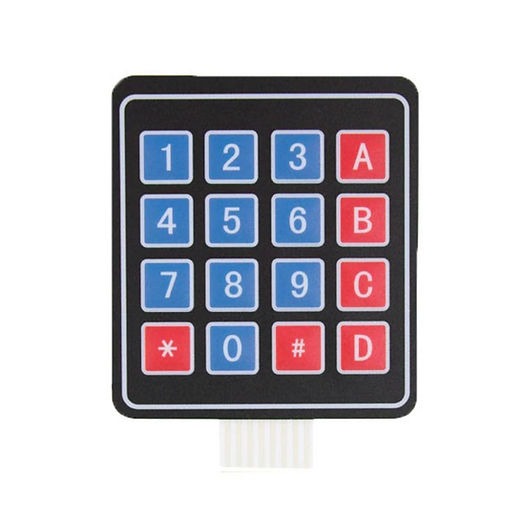
4×4 Matrix Keypad

  1. Ultra-thin design & adhesive backing provides easy integration to any project
  2. Excellent price-performance ratio
  3. Easy communication with any microcontroller
  4. 5 pins 2.54mm pitch connector, 4x 4type 16 keys.
  5. Sticker can peel off for adhesive mounting.
  6. Operating Voltage (V): 12 DC

Apple Shopping Event

Hurry and get discounts on all Apple devices up to 20%

35,00 EGP

3 People watching this product now!

Payment Methods:

Description

Description: Self-adhesive membrane keypad 4×4 – 16 keys

Diaphragm keypad equipped with 16 keys in 4 x 4 arrangement.It has numbers: from 0 to 9, letters: A, B, C, D and special characters: * i #. On the back of the keyboard there is a self-adhesive tape for easy installation. The keyboard is equipped with 8-pin tape with a 2.54 mm grid, so it can be connected to the main module, such as Arduino or STM32 using connection cables or through a goldpin strip.The keyboard can be used as a data input device.

Klawiatura membranowa 4x4


Membrane keyboard with 16 keys.

How to connect the keyboard

The keyboard can be connected in two ways. The layout of the outputs is shown in the figure below.

Sposób podłączenia klawiatury

Pin Number Description
ROWS
1 PIN1 is taken out from 1st  ROW
2 PIN2 is taken out from 2nd  ROW
3 PIN3 is taken out from 3rd  ROW
4 PIN4 is taken out from  4th ROW
COLUMN
5 PIN5 is taken out from 1st  COLUMN
6 PIN6 is taken out from 2nd  COLUMN
7 PIN7 is taken out from 3rd  COLUMN
8 PIN8 is taken out from 4th COLUMN


The layout of the outputs and how to connect the keyboard.

Diaphragm keypad specifications
  • Maximum Rating: 24 VDC, 30mA
  • Number of buttons: 16
  • Dimensions: 77 x 70 x 0.8 mm
  • Belt length with connector: 83 mm
  • Type of connector: 1 x 8 pin – female raster 2.54 (goldpin connector)
🔌
Pin Connections
1 Table
Pin Connections Table 1
BoardSensor PinConnection
Keypad4 rows + 4 cols8 board digital pins
📟
4x4 Matrix Keypad
7 Examples • C/C++ | Boards: Arduino Uno, Arduino Nano, Arduino Mega, ESP32, ESP8266, STM32, Raspberry Pi Pico
4x4 Matrix Keypad - Arduino Uno
4x4 Matrix Keypad - Arduino Nano
4x4 Matrix Keypad - Arduino Mega
4x4 Matrix Keypad - ESP32
4x4 Matrix Keypad - ESP8266
4x4 Matrix Keypad - STM32
4x4 Matrix Keypad - Raspberry Pi Pico
📄 File: 4x4_matrix_keypad_-_arduino_uno.inoArduino Uno
608 characters
1//ekostra.com
2//electronics store in egypt
3//+201008896258
4
5// Row pins on Arduino Uno: 9, 8, 7, 6 Column pins: 5, 4, 3, 2
6#include <Keypad.h>
7
8const byte ROWS = 4;
9const byte COLS = 4;
10char keys[ROWS][COLS] = {
11 {'1','2','3','A'},
12 {'4','5','6','B'},
13 {'7','8','9','C'},
14 {'*','0','#','D'}
15};
16byte rowPins[ROWS] = {9, 8, 7, 6};
17byte colPins[COLS] = {5, 4, 3, 2};
18
19Keypad keypad = Keypad(makeKeymap(keys), rowPins, colPins, ROWS, COLS);
20
21void setup() {
22 Serial.begin(115200);
23}
24
25void loop() {
26 char key = keypad.getKey();
27 if (key) {
28 Serial.print("Key pressed: ");
29 Serial.println(key);
30 }
31}
📄 File: 4x4_matrix_keypad_-_arduino_nano.inoArduino Nano
609 characters
1//ekostra.com
2//electronics store in egypt
3//+201008896258
4
5// Row pins on Arduino Nano: 9, 8, 7, 6 Column pins: 5, 4, 3, 2
6#include <Keypad.h>
7
8const byte ROWS = 4;
9const byte COLS = 4;
10char keys[ROWS][COLS] = {
11 {'1','2','3','A'},
12 {'4','5','6','B'},
13 {'7','8','9','C'},
14 {'*','0','#','D'}
15};
16byte rowPins[ROWS] = {9, 8, 7, 6};
17byte colPins[COLS] = {5, 4, 3, 2};
18
19Keypad keypad = Keypad(makeKeymap(keys), rowPins, colPins, ROWS, COLS);
20
21void setup() {
22 Serial.begin(115200);
23}
24
25void loop() {
26 char key = keypad.getKey();
27 if (key) {
28 Serial.print("Key pressed: ");
29 Serial.println(key);
30 }
31}
📄 File: 4x4_matrix_keypad_-_arduino_mega.inoArduino Mega
609 characters
1//ekostra.com
2//electronics store in egypt
3//+201008896258
4
5// Row pins on Arduino Mega: 9, 8, 7, 6 Column pins: 5, 4, 3, 2
6#include <Keypad.h>
7
8const byte ROWS = 4;
9const byte COLS = 4;
10char keys[ROWS][COLS] = {
11 {'1','2','3','A'},
12 {'4','5','6','B'},
13 {'7','8','9','C'},
14 {'*','0','#','D'}
15};
16byte rowPins[ROWS] = {9, 8, 7, 6};
17byte colPins[COLS] = {5, 4, 3, 2};
18
19Keypad keypad = Keypad(makeKeymap(keys), rowPins, colPins, ROWS, COLS);
20
21void setup() {
22 Serial.begin(115200);
23}
24
25void loop() {
26 char key = keypad.getKey();
27 if (key) {
28 Serial.print("Key pressed: ");
29 Serial.println(key);
30 }
31}
📄 File: 4x4_matrix_keypad_-_esp32.inoESP32
618 characters
1//ekostra.com
2//electronics store in egypt
3//+201008896258
4
5// Row pins on ESP32: 13, 12, 14, 27 Column pins: 26, 25, 33, 32
6#include <Keypad.h>
7
8const byte ROWS = 4;
9const byte COLS = 4;
10char keys[ROWS][COLS] = {
11 {'1','2','3','A'},
12 {'4','5','6','B'},
13 {'7','8','9','C'},
14 {'*','0','#','D'}
15};
16byte rowPins[ROWS] = {13, 12, 14, 27};
17byte colPins[COLS] = {26, 25, 33, 32};
18
19Keypad keypad = Keypad(makeKeymap(keys), rowPins, colPins, ROWS, COLS);
20
21void setup() {
22 Serial.begin(115200);
23}
24
25void loop() {
26 char key = keypad.getKey();
27 if (key) {
28 Serial.print("Key pressed: ");
29 Serial.println(key);
30 }
31}
📄 File: 4x4_matrix_keypad_-_esp8266.inoESP8266
620 characters
1//ekostra.com
2//electronics store in egypt
3//+201008896258
4
5// Row pins on ESP8266: D0, D3, D4, D5 Column pins: D6, D7, D8, D2
6#include <Keypad.h>
7
8const byte ROWS = 4;
9const byte COLS = 4;
10char keys[ROWS][COLS] = {
11 {'1','2','3','A'},
12 {'4','5','6','B'},
13 {'7','8','9','C'},
14 {'*','0','#','D'}
15};
16byte rowPins[ROWS] = {D0, D3, D4, D5};
17byte colPins[COLS] = {D6, D7, D8, D2};
18
19Keypad keypad = Keypad(makeKeymap(keys), rowPins, colPins, ROWS, COLS);
20
21void setup() {
22 Serial.begin(115200);
23}
24
25void loop() {
26 char key = keypad.getKey();
27 if (key) {
28 Serial.print("Key pressed: ");
29 Serial.println(key);
30 }
31}
📄 File: 4x4_matrix_keypad_-_stm32.inoSTM32
634 characters
1//ekostra.com
2//electronics store in egypt
3//+201008896258
4
5// Row pins on STM32: PA0, PA1, PA2, PA3 Column pins: PA4, PA5, PA6, PA7
6#include <Keypad.h>
7
8const byte ROWS = 4;
9const byte COLS = 4;
10char keys[ROWS][COLS] = {
11 {'1','2','3','A'},
12 {'4','5','6','B'},
13 {'7','8','9','C'},
14 {'*','0','#','D'}
15};
16byte rowPins[ROWS] = {PA0, PA1, PA2, PA3};
17byte colPins[COLS] = {PA4, PA5, PA6, PA7};
18
19Keypad keypad = Keypad(makeKeymap(keys), rowPins, colPins, ROWS, COLS);
20
21void setup() {
22 Serial.begin(115200);
23}
24
25void loop() {
26 char key = keypad.getKey();
27 if (key) {
28 Serial.print("Key pressed: ");
29 Serial.println(key);
30 }
31}
📄 File: 4x4_matrix_keypad_-_raspberry_pi_pico.inoRaspberry Pi Pico
630 characters
1//ekostra.com
2//electronics store in egypt
3//+201008896258
4
5// Row pins on Raspberry Pi Pico: 10, 11, 12, 13 Column pins: 14, 15, 16, 17
6#include <Keypad.h>
7
8const byte ROWS = 4;
9const byte COLS = 4;
10char keys[ROWS][COLS] = {
11 {'1','2','3','A'},
12 {'4','5','6','B'},
13 {'7','8','9','C'},
14 {'*','0','#','D'}
15};
16byte rowPins[ROWS] = {10, 11, 12, 13};
17byte colPins[COLS] = {14, 15, 16, 17};
18
19Keypad keypad = Keypad(makeKeymap(keys), rowPins, colPins, ROWS, COLS);
20
21void setup() {
22 Serial.begin(115200);
23}
24
25void loop() {
26 char key = keypad.getKey();
27 if (key) {
28 Serial.print("Key pressed: ");
29 Serial.println(key);
30 }
31}
16-button matrix keypad.

نظرة عامة ومواصفات المنتج — بالعربية

4×4 Matrix Keypad متوفر الآن في متجر إكوسترا للإلكترونيات، ضمن قسم Electronic Modules وElectronic Switches/Keypads، بسعر 35,00 EGP. كود المنتج لدينا: EK1364. المنتج متوفر في المخزون وجاهز للشحن الفوري لكل محافظات مصر مع إمكانية الدفع عند الاستلام.

أهم المواصفات الفنية:

  • Voltagev: DC 35V
  • Operating Current A: 0.1
  • Contact Resistance: 500Ω
  • Insulation Resistance M: 100
  • Dielectric Strength: 250VRms
  • الوزن: 7 g

هذا المنتج مناسب لمشاريع الأردوينو (Arduino) و ESP32 و Raspberry Pi، ومشاريع الروبوتات وإنترنت الأشياء والتعليم الهندسي. جميع القطع مفحوصة قبل الشحن.

تصفّح المزيد من Electronic Modules في إكوسترا.

Specification

Specification

WeightWeight7,0000 g
Dimensions165 × 70 × 1 cm
voltagevDC 35V
operating-current-a0.1
contact-resistance500Ω
insulation-resistance-m100
dielectric-strength250VRms

Customer Reviews