


-11% OFF
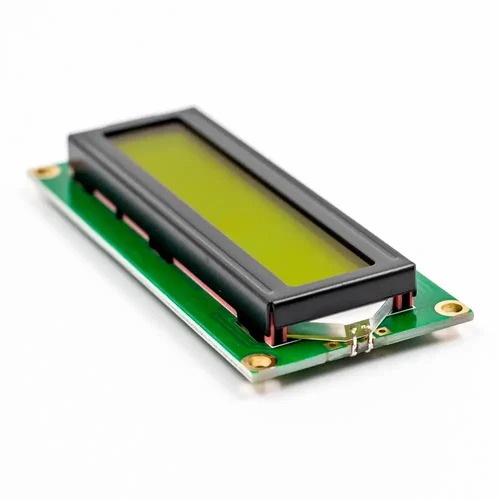
LCD1602 Yellow Green Backlight 5V
- Model: LCD1602
- Character Color: Black
- Backlight: Yellow
- Supply voltage: 5V
- Dimensions (L x W x H) mm. : 80 x 36 x 10

Apple Shopping Event
Original price was: 90,00 EGP.80,00 EGPCurrent price is: 80,00 EGP.
Payment Methods:


-11% OFF
LCD1602 Yellow Green Backlight 5V
Original price was: 90,00 EGP.80,00 EGPCurrent price is: 80,00 EGP.


Description
If you want to add some visual output to your Arduino projects, you’ll need a display. If you need only little to display, the LCD1602 Parallel LCD Display is a quite good solution.
This is LCD1602 Parallel LCD Display that provides a simple and cost-effective solution for adding a 16×2 Black on RGB Liquid Crystal Display into your project. The display is 16 character by 2 line display that has a very clear and high contrast black text upon a Gray background/backlight.
This is a great Gray backlight LCD display. It is fantastic for Arduino-based projects. This LCD1602 Parallel LCD Display with Gray Backlight is very easy to interface with Arduino or Other Microcontrollers.
The values shown on the display can be either simple text or numerical values read by the sensors, such as temperature or pressure, or even the number of cycles that the Arduino is performing.
One thing to consider is you’ll waste about 8 Pins on your Arduino for the display to get working. Luckily there exists an I2C adapter that you can solder right onto the pins of the display. So all you need to connect are the I2C pins, which show a good library and little of coding. We have the same LCD module with a pre-assembled I2C adapter, click on the name below to check it
Features :
- 16 characters wide, 2 rows
- Black text on the Gray background
- Single LED backlight included can be dimmed easily with a resistor or PWM.
- Can be fully controlled with only 6 digital lines! (Any analog/digital pins can be used)
Package Includes :
1 x LCD1602 Parallel LCD Display with Gray Backlight
نظرة عامة ومواصفات المنتج — بالعربية
LCD1602 Yellow Green Backlight 5V متوفر الآن في متجر إكوسترا للإلكترونيات، ضمن قسم Display Modules وLCD Display، بسعر 80,00 EGP. كود المنتج لدينا: EK348. المنتج متوفر في المخزون وجاهز للشحن الفوري لكل محافظات مصر مع إمكانية الدفع عند الاستلام.
أهم المواصفات الفنية:
- الموديل: LCD1602
- Characters: 16
- Character Color: Black
- Backlight: Yellow
- Input Voltage (V): 5
- الوزن: 3 g
هذا المنتج مناسب لمشاريع الأردوينو (Arduino) و ESP32 و Raspberry Pi، ومشاريع الروبوتات وإنترنت الأشياء والتعليم الهندسي. جميع القطع مفحوصة قبل الشحن.
تصفّح المزيد من Display Modules في إكوسترا.
Specification
 Specification
| WeightWeight | 30,0000 g |
|---|---|
| Dimensions | 36 × 80 × 10 cm |
| Model | LCD1602 |
| Characters | 16 |
| Character Color | Black |
| Backlight | Yellow |
| Input Voltage (V) | 5 |


